📱 Native Android Mobile App
The native Android companion app for Family Budget Tracker puts real-time budgeting in your pocket with biometric security, instant push notification and SMS transaction ingestion, listener transparency, and high-performance interactive charts.
1. Download & Installation
Family Budget Tracker is distributed directly as an optimized Android package (APK) for fast updates and maximum device compatibility.
- Log in to your account on the web at family-budget.getdigraw.com.
- Navigate to Settings → Download Android App (or access
/api/v1/app/download). - Download the signed release APK (e.g.
family-budget-tracker-v1.0.92.apk). - Tap the downloaded file to install. If prompted by Android, allow "Install from this source".
- Open Family Budget and log in with your email or Google account.
2. Biometric App Lock (Fingerprint & Face ID)
Protect your financial privacy whenever you hand your phone to someone else.
- In the mobile app, tap Settings in the bottom navigation.
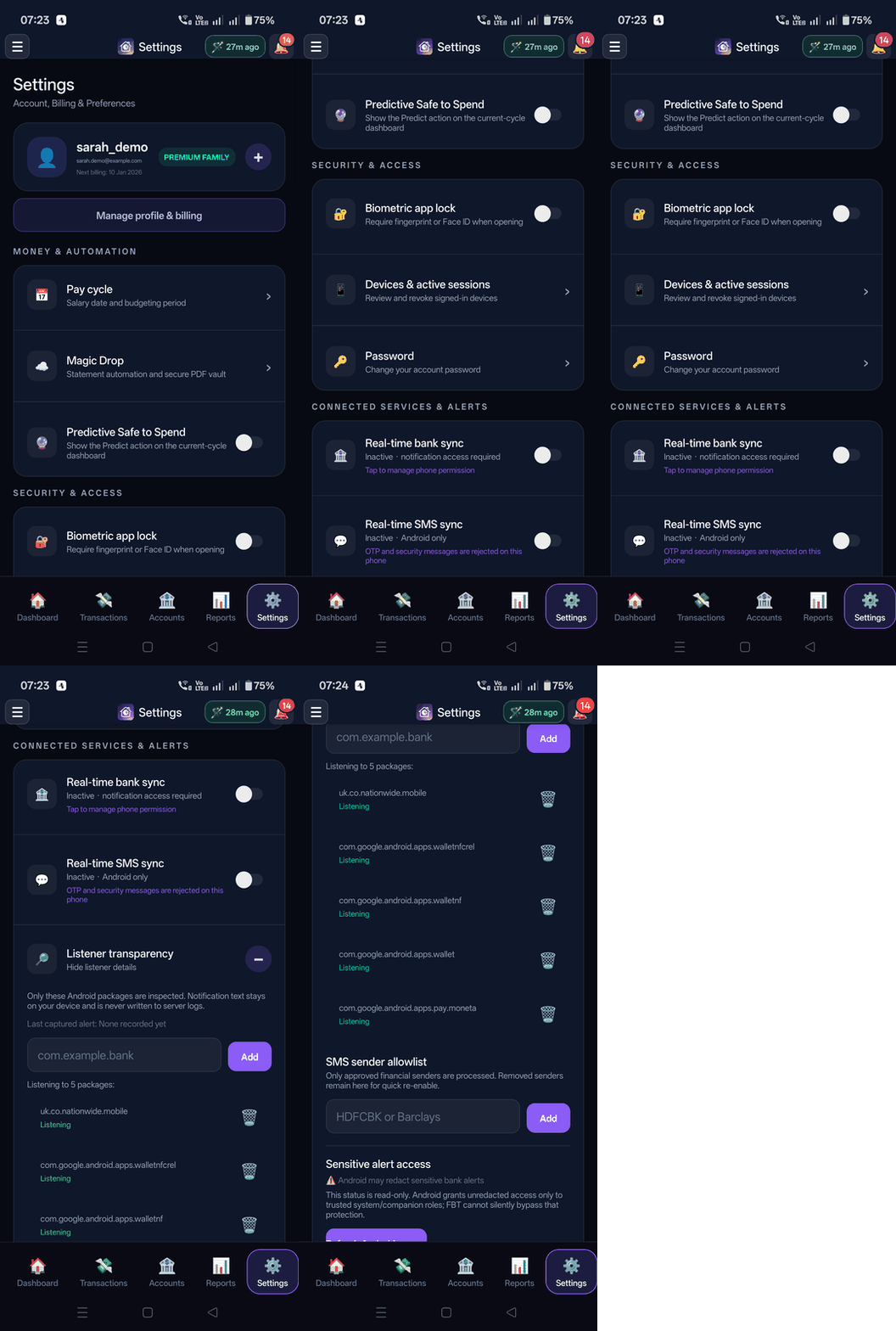
- Toggle "Biometric app lock".
- Confirm with your fingerprint or face scan.
- Security Coverage: Biometric authentication is enforced both on initial app launch and whenever the app resumes from the background.
3. Real-Time Bank Sync & Listener Transparency
Never manually type a coffee or grocery receipt again. Family Budget Tracker pairs on-device real-time bank push notifications with an unprecedented Listener Transparency privacy architecture.
⚡ Real-Time Bank Push Sync
Whenever you tap your contactless card, make a purchase with Google Wallet, or receive a direct debit, your banking app sends an Android notification. Family Budget Tracker instantly:
- Captures the alert: Extracts the spend amount, currency symbol (
£,$,€), and merchant name. - Auto-Categorizes: Assigns the appropriate category (e.g. Groceries, Transport, Utilities) using smart merchant matching.
- Updates Safe to Spend: Immediately recomputes your remaining spendable balance for the pay cycle with zero manual interaction.
- Live Sync Status: The header displays a live pulse pill (
🪄 4m ago/🪄 just now) indicating your latest synchronized state.
🔎 Listener Transparency: Zero-Cloud Privacy Guarantee
Most budgeting apps that read notifications hide what they do with your data. Family Budget Tracker provides full Listener Transparency accessible directly in Settings → Connected Services & Alerts → Listener transparency:
Only explicitly allowlisted Android bank packages are inspected. Notification text is processed entirely in memory on your physical Android device and is never written to server logs or remote databases.
- Strict App Allowlist: Only known banking packages (Nationwide, Monzo, Barclays, Revolut, Chase, Starling, Google Wallet, etc.) are processed. All personal messages (WhatsApp, Signal, Email, Photos) are completely ignored and discarded by the OS service.
- Fully Expanded Transparency Panel: View the live list of monitored packages (e.g.
uk.co.nationwide.mobile,com.google.android.apps.wallet,com.google.android.apps.pay.moneta). - Custom Package Management: Easily add any banking app package ID (e.g.
com.yourbank.app) with the built-in + Add input field to expand coverage to niche or international banks. - Live Audit Line: The transparency panel displays the exact app package and timestamp of the last captured notification so you can audit operations in real time.
- On-Device Pending Review Queue: If a bank alert mentions an unmapped card or needs account disambiguation, it is quarantined in a local "Needs account selection" panel stored only on your device until you explicitly accept or reject it.
How to Enable & Configure:
- In the mobile app, tap Settings in the bottom navigation bar.
- Scroll to Connected Services & Alerts → Real-time bank sync and toggle it on.
- Android will open Device Notification Access; toggle access for Family Budget Tracker.
- Tap "Listener transparency" to fully expand and inspect active package mappings or add custom bank app package names.
4. Secure SMS Bank Alert Sync & Smart Sender Discovery
For financial institutions that send transaction receipts and spend alerts via SMS rather than app push notifications, Family Budget Tracker includes a dedicated, privacy-first Real-time SMS Sync engine on Android.
To guarantee absolute privacy and security, any incoming SMS containing one-time passcodes (OTP), verification tokens, 2FA codes, PINs, passwords, or security phrases is immediately and automatically rejected and discarded on-device. OTPs are never parsed, never logged, and never transmitted.
Key Capabilities:
- 100% On-Device Parsing: Financial SMS messages (e.g. "You spent £24.50 at Tesco on card ending 1234") are parsed entirely on your phone via deterministic regex engines.
- Smart Sender Auto-Discovery: The system automatically recognizes official bank sender IDs and tokens (e.g., Barclays, Chase, Amex, Nationwide, Santander) while ignoring non-financial contacts.
- Custom Sender Allowlist & Blocklist: Add or remove custom SMS sender handles in Settings to customize exactly which financial institutions are tracked.
- Instant Safe to Spend Updates: SMS transactions immediately reflect across your household accounts and update your remaining spending budget.
How to Enable SMS Sync:
- In the mobile app, navigate to Settings → Connected Services & Alerts.
- Toggle on "Real-time SMS sync".
- When prompted by Android, grant SMS receive permissions for Family Budget Tracker.
5. Interactive Charts
High-performance interactive financial charts designed for 60fps fluid touch interactions:
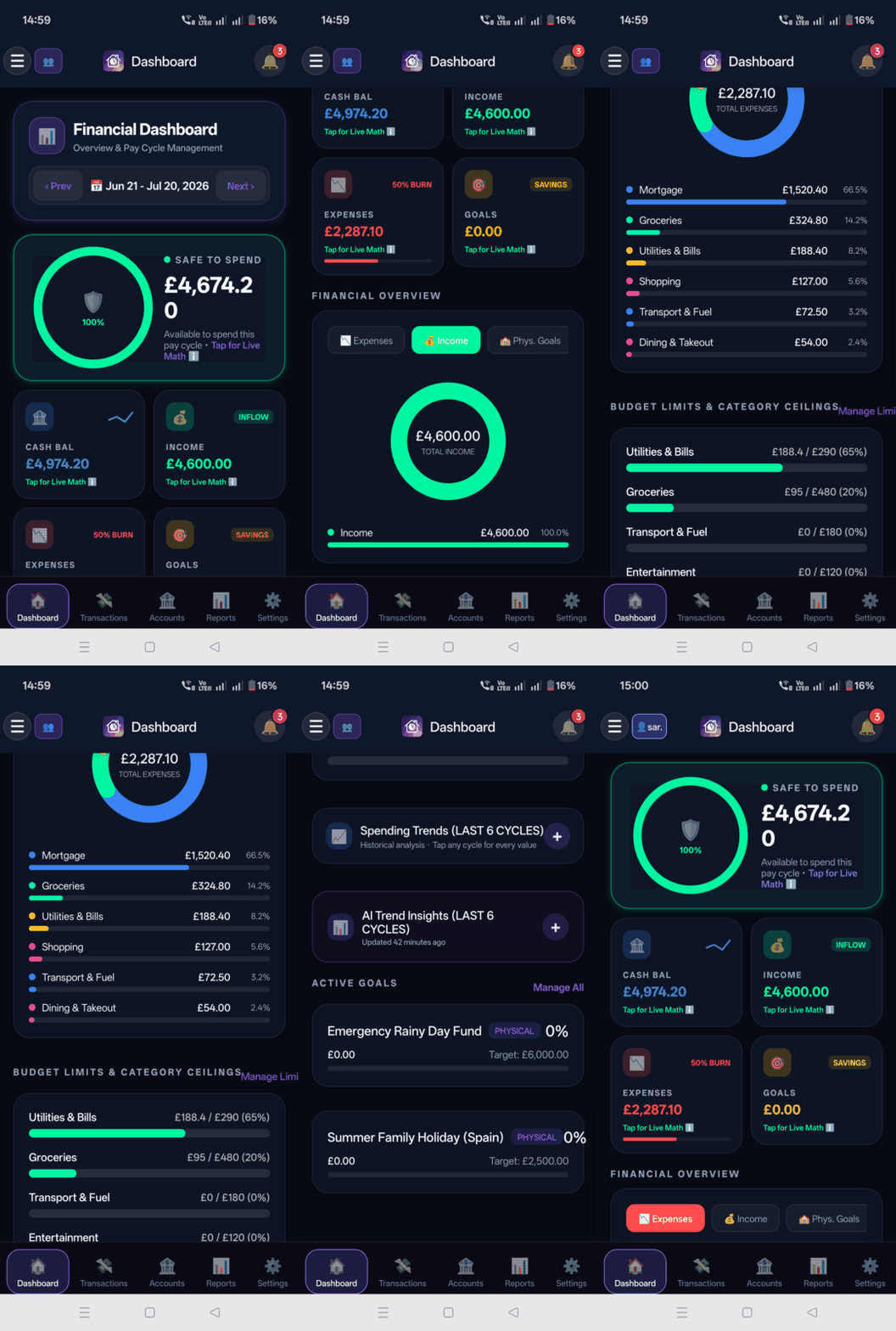
- Cash Flow Sparklines: Real-time mini sparklines in the dashboard header.
- Radial Category Donut: Smooth touch-enabled category breakdowns.
- Multi-Cycle Spending Trend Lines: Touch and scrub across historical pay cycles.
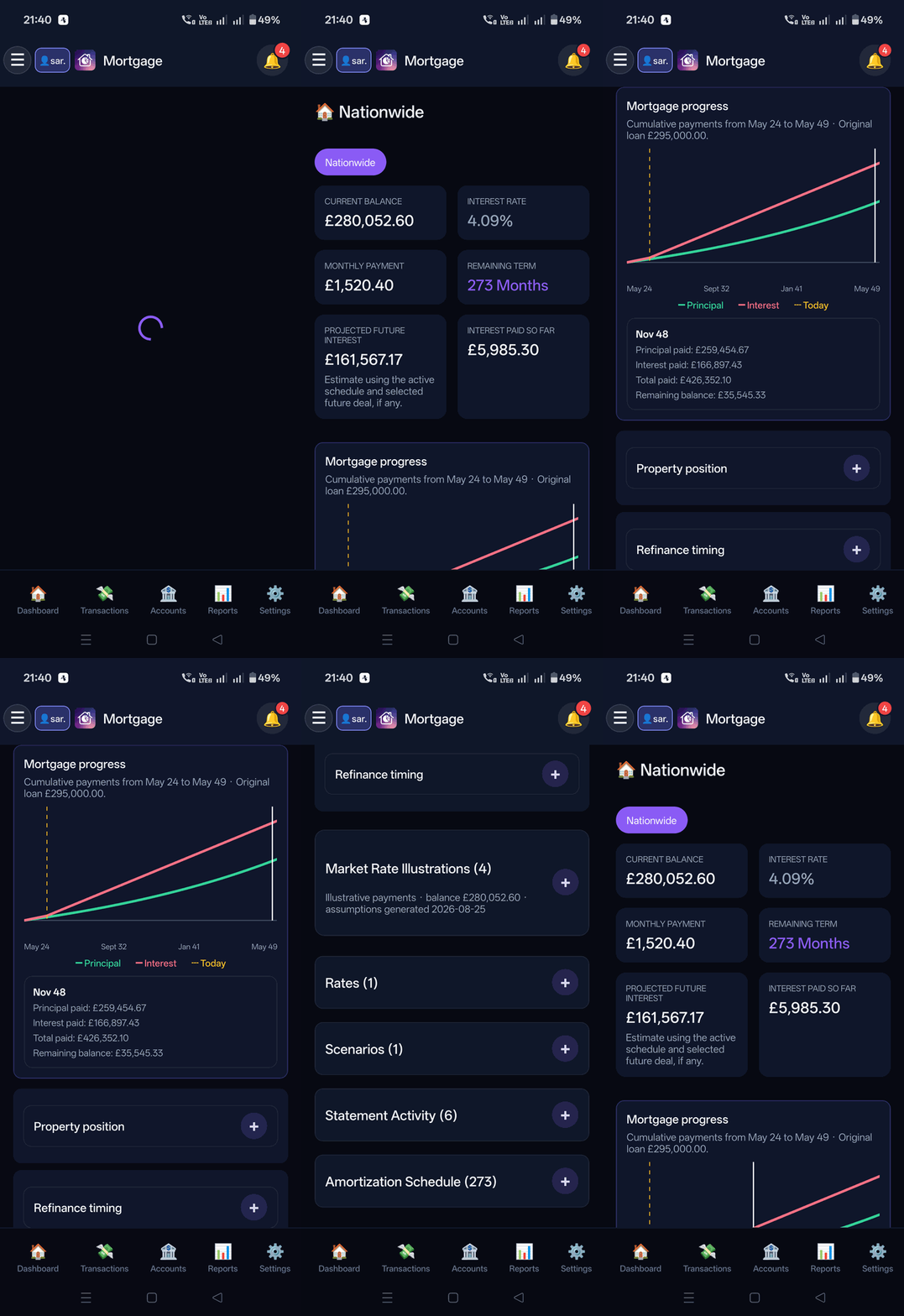
- Interactive Mortgage Amortization: Scrub along your loan repayment curve.
6. Hands-Free Voice Commands
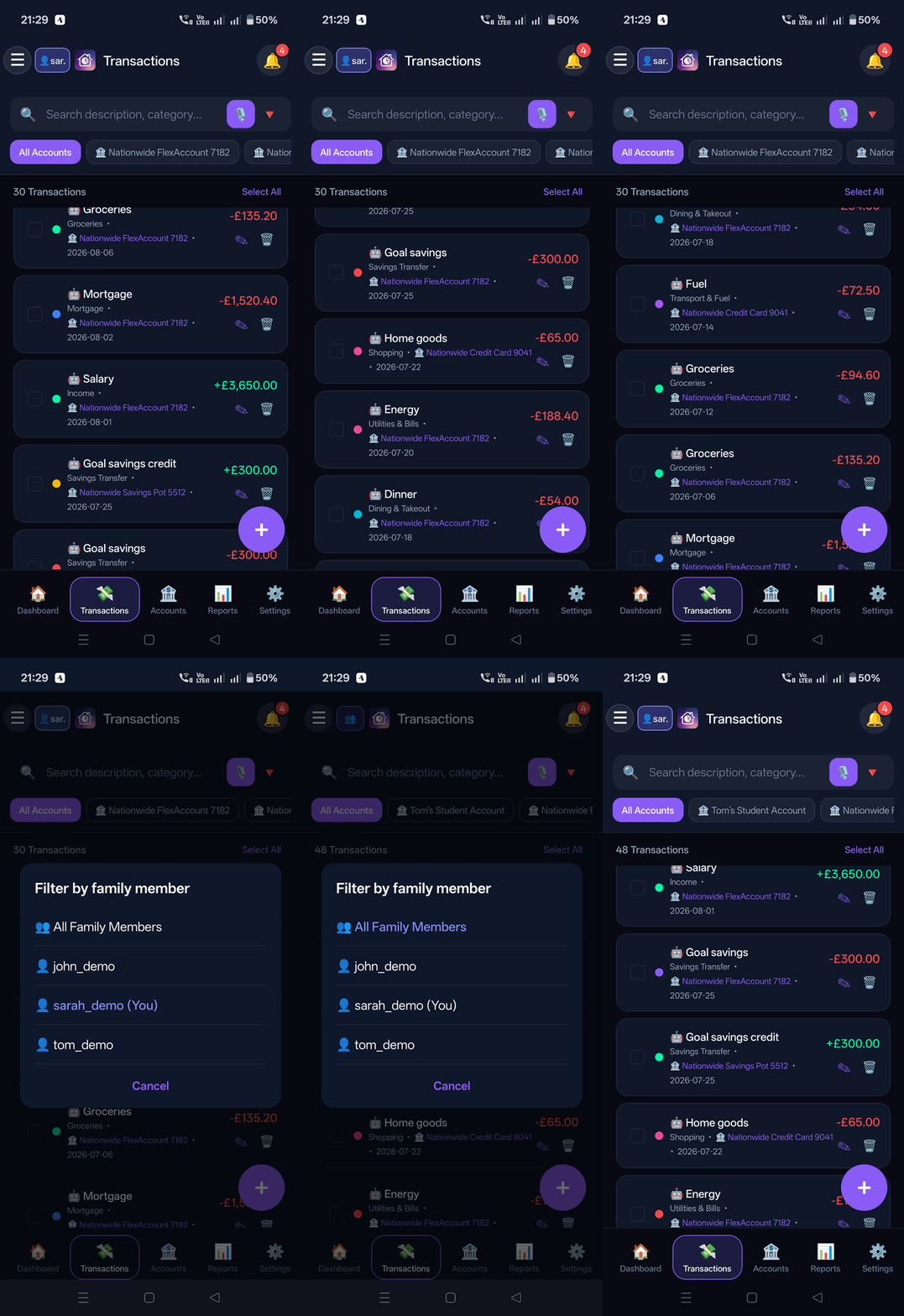
Family Budget Tracker features a fast, deterministic voice command engine on both Web and Mobile. Tap the floating microphone button on the Transactions screen to speak natural commands.
Every voice command must start with exactly one action verb:
Add, Remove, or Filter. The microphone captures speech, displays a live transcript under "What I heard", and automatically submits your command approximately 2.5 seconds after you pause speaking.
1. ➕ Add Commands (Expense & Income Creation)
Speak an amount, currency, and merchant or description. The deterministic parser resolves details against your accounts and transaction history:
Add £20 Costa Coffee(Short form: auto-detects today's date, your primary checking account, and categorizes as Dining Out / Coffee from merchant history)Add £60 grocery Sainsburys to Barclays debit on 27 July(Full form: explicitly sets category, merchant, account, and date)Add £250 freelance payment to Chase(Recognizes income terms like salary, refund, payment, or credit to set type to Income)
What Happens on Add: The app opens the Add Transaction Modal with the fields pre-populated for visual review (Date, Amount, Account, Category, Description). You can verify or tweak any values before tapping "Add Transaction" to save. Voice commands never write transactions silently in the background.
2. 🗑️ Remove Commands (Single vs Multiple Matches)
To target a transaction for removal, voice commands require an exact amount with currency plus either a date or merchant description:
Remove £1 Counter CreditRemove £81.50 Sainsbury on 20 AugustRemove £40 Sainsburys on 27 July
What Happens on Remove:
- Single Match Found: Closes the voice panel and immediately opens the transaction preview modal for that exact record. To delete, you must tap the trash icon and confirm the delete prompt.
- Multiple Transactions Match (Disambiguation Flow): If multiple transactions share the same amount and criteria (for example, two £1 counter credits or duplicate coffee purchases), the system opens a "Choose transaction (N matches)" dialog. Each matching card shows the date, merchant, exact amount, and account name. Tapping a card opens its preview modal for manual review.
- Safety Rule: Voice interpretation never deletes a transaction automatically. Destructive deletion strictly requires manual confirmation.
3. 🔍 Filter Commands (Multi-Dimension Ledger Search)
Dynamically filter and sort the transaction feed without leaving your view or clicking multiple dropdowns:
Filter today's transactions(Filters by today's date)Filter source notification(Filters transactions captured via real-time bank push notifications)Filter description Vanguard(Searches descriptions and merchant names)Filter description Sainsbury category groceries account Barclays debit July £50(Combines account, category, merchant, date range, and minimum amount with AND semantics)Filter all(Resets all active filters to view the full ledger)
What Happens on Filter: The ledger instantly updates with the parsed filters applied across your accounts, categories, sources, and dates. The app automatically scrolls to the first matching transaction in your feed, and displays a 1-tap "Clear voice filters" button to restore the default view.
7. In-App Updates
Whenever a new version of the app is released, you will receive an in-app banner and push notification with release notes and a 1-tap download link to upgrade cleanly without losing any data.
Need Mobile Help?
Email our mobile engineering team at support@getdigraw.com.